1. Where the Problem Starts
Anyone who’s used OceanBase has hit this scenario: tables partitioned by time range require partitions to be created manually in advance. Forget to create a new partition, and data writes fail immediately with a “partition not found” error. Create too many partitions upfront, and empty partition metadata becomes a maintenance burden. For tables like logs and order transaction records — data with a clear lifecycle — DBAs also need to periodically clean up expired partitions. One mistake and you risk data loss or production incidents.
Starting from V4.3.5 BP2, OceanBase introduced dynamic partitioning to completely remove “partition creation and deletion” from the DBA’s daily operations. An important clarification upfront: dynamic partitioning is not an entirely new partition type. It’s an automated management layer on top of RANGE / RANGE COLUMNS partitioning. Understanding its design logic and applicable boundaries is more valuable than just memorizing the syntax.
2. The Design Logic Behind DYNAMIC_PARTITION_POLICY
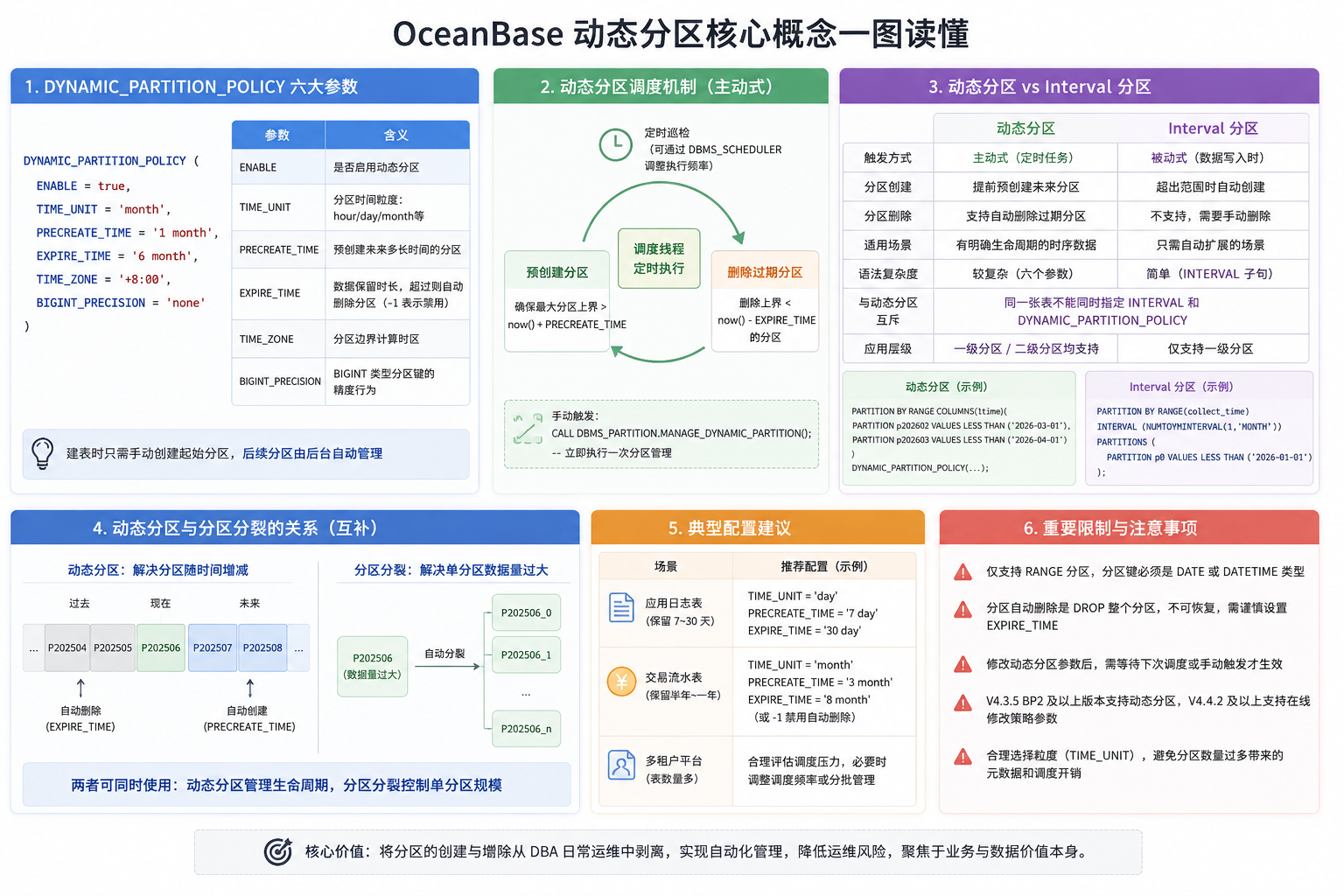
You declare the partition management strategy via the DYNAMIC_PARTITION_POLICY clause at table creation. Here’s a real passport log table example:
1 | CREATE TABLE api_passport_logs ( |
This CREATE TABLE statement covers all six dynamic partitioning parameters. You only need to manually define the first few partitions — subsequent partitions are created automatically by a background scheduler task, and expired partitions are cleaned up automatically. Note that dynamic partition management doesn’t kick in immediately after table creation. You need to wait for the next scheduled task trigger, or manually call DBMS_PARTITION.MANAGE_DYNAMIC_PARTITION().
TIME_UNIT: Choosing Partition Granularity
TIME_UNIT determines the time granularity of partitions. Supported values: hour, day, week, month, year. The choice should be based on data growth rate, per-partition data volume, query time ranges, and data retention requirements.
Taking day granularity as an example: if you write 100 million rows per day and retain 7 days, day partitioning works well — per-partition volume stays manageable, and queries are precise. But if you only write 10 million rows per day and need to retain 10 years, day granularity would generate 3,650 partitions. In that case, month granularity is more appropriate. In OceanBase’s distributed architecture, partitions are the fundamental unit for data distribution, replica replication, and load balancing. Increasing partition count brings overhead in metadata management, scheduling, and load balancing — so avoid finer granularity than you actually need.
Note that partition key type also constrains TIME_UNIT values. For example, DATE-type partition keys don’t support hour granularity, and YEAR type can only use year granularity. TIME_UNIT doesn’t freely combine with any partition key type.
PRECREATE_TIME: Coverage Window for Future Partitions
PRECREATE_TIME controls the time coverage range for pre-created partitions. It takes a string with time units (e.g., '1 month', '7 day', '2 hour'). Its precise meaning: each time the scheduler runs, it ensures the upper bound of the largest partition exceeds now() + PRECREATE_TIME.
Taking TIME_UNIT = month and PRECREATE_TIME = '1 month' as an example: the scheduler ensures partitions covering at least one month from now are already created. This isn’t “run ADD PARTITION one month early” — it’s ensuring the future partition coverage window always meets business write requirements. PRECREATE_TIME essentially provides a future partition coverage window for the dynamic partition scheduler. A larger pre-creation window improves tolerance for scheduling delays or consecutive scheduling failures. If future partitions aren’t created in time and business write times exceed the current maximum partition bound, writes will still fail.
PRECREATE_TIME should be determined based on scheduling cycle, business write patterns, and acceptable pre-created partition count. A single dynamic partition management task creates at most 2,048 partitions. If a long scheduling gap requires creating a large backlog of partitions, multiple task executions may be needed.
EXPIRE_TIME: Partition-Level Lifecycle Management
EXPIRE_TIME defines data retention duration, also taking a string with time units (e.g., '6 month', '90 day', '1 year'). Each time the scheduler runs, it drops partitions that satisfy:
1 | Partition upper bound < now() - EXPIRE_TIME |
One critical point: EXPIRE_TIME evaluates whether the entire partition is expired. When expired, the entire partition is DROPped — it doesn’t delete rows individually by time.
Taking the log table with '6 month' as an example: if the current time is 2026-08-25, the deletion condition is partition upper bound < 2026-02-25. This means partitions with upper bounds before February 25th are dropped entirely. Since we’re partitioning by month, the actual retained data range isn’t precisely 180 days — it’s granular to partition boundaries. Compared to row-by-row DELETE, partition-level DROP avoids scanning and deleting large volumes of historical rows, typically making it more suitable for lifecycle management of large-scale time-series data. However, partition drops can still consume resources (involving data lifecycle processing for corresponding Tablets/replicas) and shouldn’t be treated as a zero-cost operation.
For tables with audit requirements or data retrieval needs, plan data archiving before EXPIRE_TIME takes effect. If your organization has an approval process for data deletion, you can set EXPIRE_TIME to -1 to disable auto-expiry deletion, keeping only the auto-creation capability. But disabling auto-deletion doesn’t mean data is automatically archived — managing expired data still requires DBA planning.
TIME_ZONE and BIGINT_PRECISION
TIME_ZONE specifies the time zone used for dynamic partition current-time calculations and time-type partition key boundary computations. Setting it to 'default' uses the tenant time zone; explicitly setting '+8:00' etc. uses the specified offset. For DATETIME/DATE/TIMESTAMP partition keys, it’s recommended to explicitly specify the business-unified time zone to avoid mismatches between business time semantics and partition boundary calculations. Geographic time zone formats like 'Asia/Shanghai' are also supported.
BIGINT_PRECISION applies only to BIGINT-type timestamp partition keys, specifying timestamp precision (supports 'none', 'us', 'ms', 's'). For non-BIGINT partition key types (DATETIME, DATE, TIMESTAMP, YEAR), use 'none' or omit the parameter.
3. Partition Key Type Support
Dynamic partitioning supports Range and Range Columns partitioning, but with clear restrictions on partition key types:
| Partition Method | Supported Key Types |
|---|---|
| Range Columns | DATE, DATETIME, TIMESTAMP, YEAR, BIGINT (requires BIGINT_PRECISION) |
| Range | YEAR, BIGINT (requires BIGINT_PRECISION) |
The most common pattern is Range Columns with DATETIME partition keys — the log table above uses this. If your business uses integer timestamps (e.g., Unix millisecond timestamps), you can use Range with BIGINT_PRECISION for dynamic partitioning.
Dynamic partitioning operates on first-level partitions. For subpartitioned tables, you can only enable dynamic partition management on first-level partitions — subpartitions cannot be independently managed with dynamic partition lifecycle.
4. Dynamic Partitioning vs. Interval Partitioning
OceanBase V4.4.2 introduced INTERVAL partitioning in Oracle compatibility mode. The core mechanism differences:
| Dynamic Partitioning | Interval Partitioning | |
|---|---|---|
| Creation trigger | Scheduled task pre-creation | Data write trigger |
| Drop expired partitions | Supported | Not supported |
| Primary purpose | Automated lifecycle management | Auto extension |
| Version | V4.3.5 BP2 | V4.4.2+, Oracle compatibility mode |
The biggest mechanism difference: Interval is triggered by DML, while dynamic partitioning uses proactive background scheduled tasks. They’re different automated partition management mechanisms with different version support, compatibility modes, and partition levels. Choose based on your specific OceanBase version and business requirements.
5. How Dynamic Partitioning Actually Runs
Dynamic partitioning is a schedule-driven automation mechanism, not a real-time trigger that fires at exact time boundaries. Its operation flow: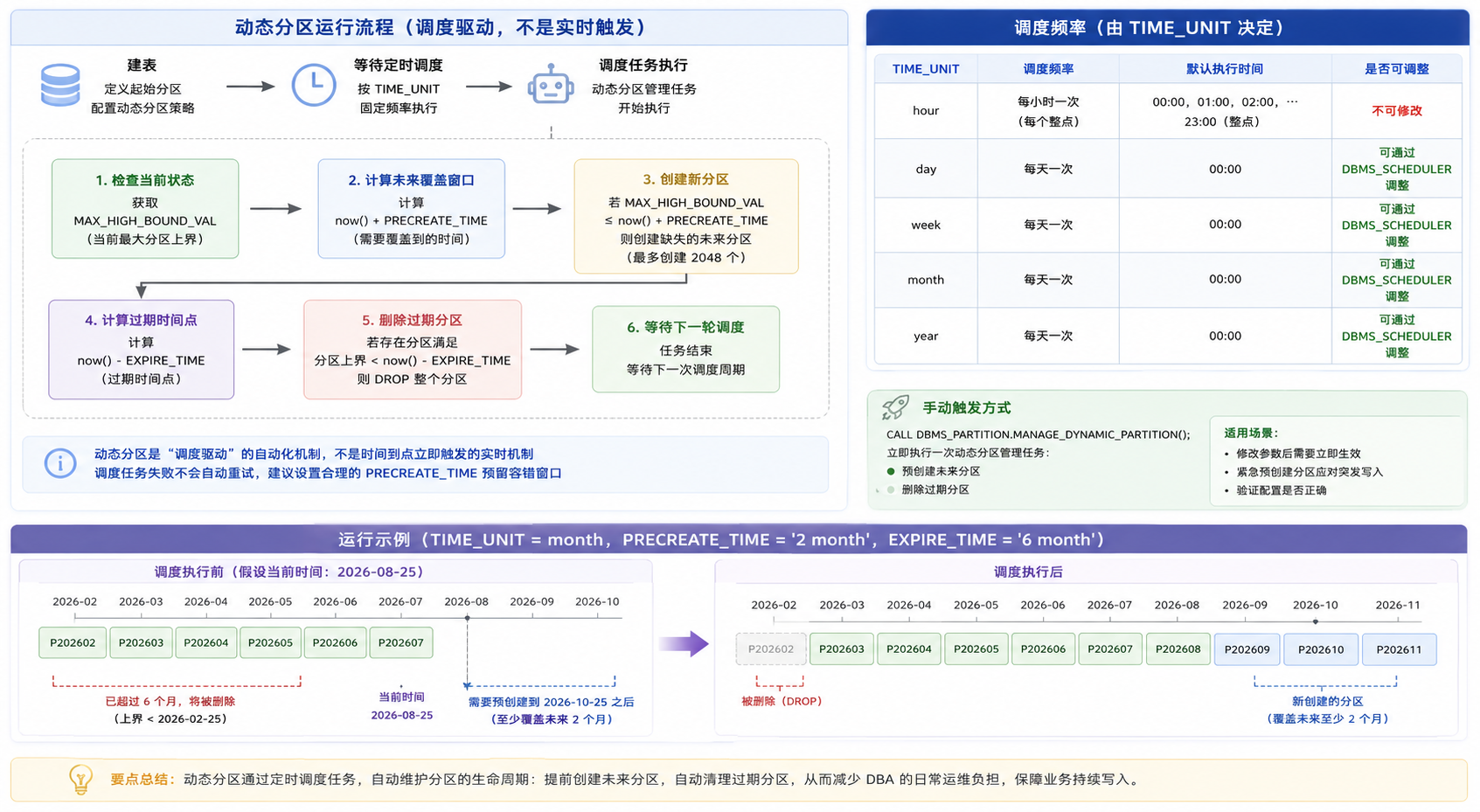
In V4.3.5, scheduling frequency is determined by TIME_UNIT:
| TIME_UNIT | Schedule Frequency | Can Execution Time Be Adjusted |
|---|---|---|
| hour | Every hour on the hour | Cannot be modified |
| day / week / month / year | Once daily, default midnight | Adjustable via DBMS_SCHEDULER |
Hourly task scheduling times are fixed and cannot be modified. Daily tasks default to midnight execution. For businesses sensitive to DDL/metadata operation timing, you can use DBMS_SCHEDULER to shift daily tasks to off-peak hours.
OceanBase provides the system package DBMS_PARTITION, where MANAGE_DYNAMIC_PARTITION() can manually trigger a one-time partition management task. This is useful in several scenarios: you’ve modified dynamic partition parameters and need them to take effect immediately; you need to urgently pre-create partitions for a traffic spike; or you want to verify your configuration is correct. After modifying dynamic partition parameters, pre-creation and deletion operations don’t take effect immediately — you must wait for the next schedule or trigger manually. This behavior differs from many DBAs’ expectations — in MySQL, ALTER TABLE ADD PARTITION executes immediately, whereas OceanBase’s dynamic partitioning uses an asynchronous scheduling model.
6. Parameter Modification Boundaries
V4.3.5 BP2 supports online modification of dynamic partition policy parameters via ALTER TABLE ... SET DYNAMIC_PARTITION_POLICY, but not all parameters are modifiable:
| Parameter | Modifiable |
|---|---|
| ENABLE | Yes |
| PRECREATE_TIME | Yes |
| EXPIRE_TIME | Yes |
| TIME_UNIT | No |
| TIME_ZONE | No |
| BIGINT_PRECISION | No |
TIME_UNIT, TIME_ZONE, and BIGINT_PRECISION cannot be changed after table creation. If these are misconfigured, the only fix is to rebuild the table. This means you need to carefully determine partition granularity, time zone, and precision settings at initial table creation.
7. Dynamic Partitioning and Partition Splitting
OceanBase V4.3.4 introduced automatic partition splitting (experimental in V4.3.4, GA in V4.3.5). It solves the problem of individual partitions growing too large. Auto-splitting uses SIZE to specify the split threshold; if SIZE isn’t specified, it uses the tenant-level auto_split_tablet_size. Currently, auto-splitting primarily targets qualifying Range/Range Columns first-level partitioned primary key tables, with restrictions on primary keys and partition key prefixes.
| Feature | Problem Solved | Trigger |
|---|---|---|
| Dynamic Partitioning | Auto scale partition count up/down over time | Scheduled task |
| Partition Splitting | Individual partition data volume too large | Data volume reaches SIZE threshold |
The two are complementary: dynamic partitioning manages partition lifecycle (creation and expiry deletion), while partition splitting controls per-partition data scale. But they’re not the same level of capability — confirm each one’s constraints before combining them.
8. How to Verify Dynamic Partitioning in Production
After configuring dynamic partitioning, the DBA’s main question: is the scheduler running properly? OceanBase V4.3.5 BP2 provides system views for monitoring:
1 | SELECT |
MAX_HIGH_BOUND_VAL is the upper bound of the current maximum partition. The core logic for determining if dynamic partitioning is running correctly:
1 | MAX_HIGH_BOUND_VAL should be > now() + PRECREATE_TIME |
If this condition isn’t met, the scheduler may not be executing properly, or partition creation encountered errors. First try manually calling DBMS_PARTITION.MANAGE_DYNAMIC_PARTITION() to trigger a scheduling cycle, then observe whether missing partitions get created. If nothing changes after manual trigger, check the cluster’s scheduler task status and logs.
9. Practical Selection Guidance
Dynamic partitioning is best suited for time-series scenarios where data has a clear lifecycle. Here are configuration approaches for typical scenarios — specific parameters need adjustment based on actual business:
Application log tables. High write volume, data retained 7-30 days, queries primarily time-range based. TIME_UNIT is typically day, PRECREATE_TIME based on scheduling fault tolerance needs (e.g., '7 day'), EXPIRE_TIME based on data retention requirements (e.g., '30 day').
Transaction record tables. Large data volume, long retention periods, possible audit requirements. TIME_UNIT is typically month to control partition count. PRECREATE_TIME and EXPIRE_TIME should be determined by business data retention policy and compliance requirements — avoid blindly applying fixed rules of thumb. If the audit department requires approval for data deletion, set EXPIRE_TIME to -1 to disable auto-deletion.
Multi-tenant SaaS platforms. As the number of dynamic partition tables increases, the background partition management tasks face more tables to handle and more DDL management pressure. With many tables, evaluate the scheduler’s capacity and control concurrency through scheduling frequency adjustments or batch management when necessary.
10. Limitations to Be Aware Of
Automatic partition deletion has no “recycle bin” mechanism — expired partitions are DROPped immediately. In environments with strict data compliance requirements, this behavior needs to be confirmed with business and compliance teams before going live. At minimum, establish a data archiving process to sync data that needs retention to offline storage before partitions are dropped.
From a version evolution perspective, V4.3.5 BP2 is the first version to support dynamic partitioning, and already supports modifying ENABLE, PRECREATE_TIME, and EXPIRE_TIME via ALTER TABLE. Confirm your target version’s specific capabilities before production deployment.
Dynamic partitioning essentially automates partition operations and maintenance, but it doesn’t replace partition design itself. Choosing appropriate granularity, setting correct retention periods, and planning archiving workflows — these decisions still require DBAs to make judgment calls based on business characteristics. Tools solve execution problems; decision-making remains a human responsibility.