1. Component Overview
JetCache is a general-purpose cache access framework open-sourced by Alibaba (source). It does one thing: with a unified Cache<K, V> interface, it seamlessly combines local in-memory cache with remote Redis cache, then provides standard cache protocol integration through both annotations and API — letting business code use caching in the most concise way possible.
Compared to Spring Cache, JetCache’s core advantages:
| Capability | Spring Cache | JetCache |
|---|---|---|
| TTL (time-to-live) | Not natively supported, requires customization | Natively supported — write expire directly on the annotation |
| Two-level cache | Not supported | Natively supported CacheType.BOTH (local + remote) |
| Auto cache refresh | Not supported | Supported @CacheRefresh with globally unique distributed refresh |
| Penetration protection | Not supported | Supported @CachePenetrationProtect |
| Distributed lock | Not supported | Built-in tryLock / tryLockAndRun |
| Async API | Not supported | Supported (truly non-blocking with Lettuce client) |
| Stats & monitoring | Requires third-party | Built-in hit rate, load count, and other statistics |
| Update/delete cache annotations | Exists but limited | @CacheUpdate / @CacheInvalidate with SpEL support |
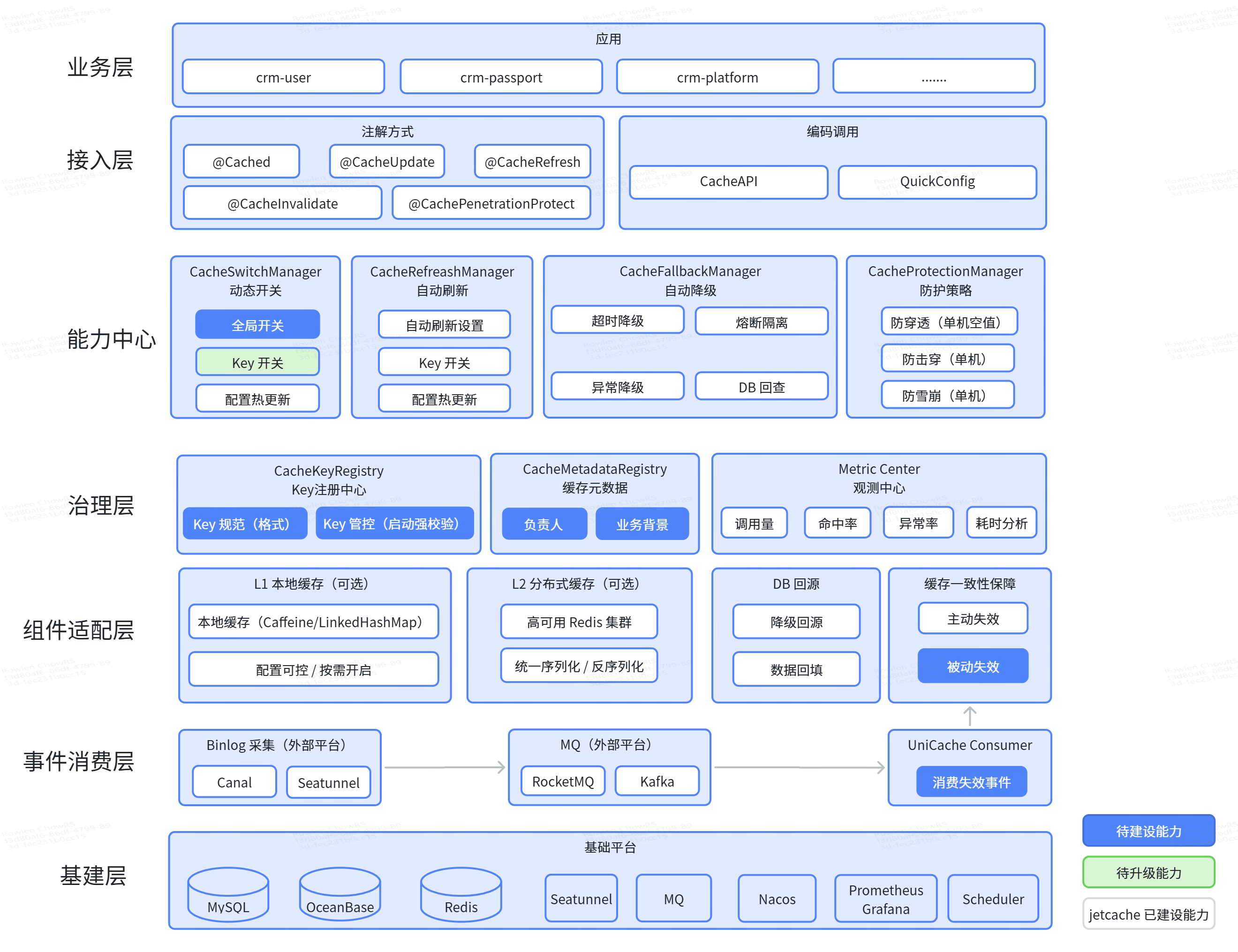
2. Core Concepts
2.1 Cache Interface
Whether the underlying implementation is Caffeine (local memory), Redis (remote), or a two-level combination, business code always faces the same interface:
1 | public interface Cache<K, V> { |
Using it feels like working with a Map — very intuitive.
2.2 CacheType — Cache Types
| Type | Meaning | Use Case | Notes |
|---|---|---|---|
CacheType.LOCAL |
Pure local in-memory cache (Caffeine or LinkedHashMap) |
Dictionary data, config items, rarely changing data | No current use case for local cache |
CacheType.REMOTE |
Pure remote cache (Redis) | General business scenarios, centralized Redis storage | Our current usage |
CacheType.BOTH |
Two-level cache: local + remote | High-frequency reads, local for volume + Redis as fallback | No current use case for multi-level cache |
2.3 Key Generation Rules
The final key stored in Redis follows this format:
1 | Redis key = keyPrefix + keyConvertor(K); |
keyPrefix: comes from
@Cached(name = "toc:user:info:")‘sname, or fromQuickConfig.newBuilder("toc:user:info:")‘s parameter. Its job is to give different business domains a “namespace prefix” to avoid key collisions.keyConvertor: converts Java objects to Strings. The default uses
fastjson2— String-type keys pass through directly, complex objects get JSON-serialized.
Example: @Cached(name = "toc:user:info:", key = "#userId") with userId = 12345 produces the Redis key toc:user:info:12345.
2.4 Area — Cache Areas
Area is JetCache’s multi-tenancy mechanism. There’s a default "default" area corresponding to jetcache.local.default and jetcache.remote.default in the config. If your project needs to connect to multiple Redis instances, you can configure multiple areas and specify area = "otherArea" in annotations. Most scenarios work fine with the default.
3. Quick Integration (Spring Boot)
Step 1: Add Maven Dependency
Choose the starter matching your application’s Redis client (pick one):
1 | <!-- Option 1: Lettuce (recommended, supports async API) --> |
Version notes: JetCache 2.8+ requires JDK 17+, Spring Boot 3.x+, and Spring Framework 6.x+. If your project is still on JDK 8, use version 2.7.x.
Step 2: Configure application.yml
1 | jetcache: |
Step 3: Add Annotations to the Startup Class
1 |
|
@EnableMethodCache(basePackages = "..."): tells JetCache which packages to scan for Spring Beans with@Cached,@CacheUpdate,@CacheInvalidateannotations and create AOP proxies for them. basePackages must cover all packages using cache annotations.@EnableCreateCacheAnnotation: activates@CreateCacheannotation support for injecting Cache instances directly on fields. Marked as Deprecated in the source — optional.
Integration complete. Now let’s cover usage.
4. Usage Guide
4.1 Annotation-Driven Cache (Declarative)
This is the most common approach. Add annotations to methods on your Service interface (or implementation class), and JetCache automatically handles cache reads, writes, and deletes via Spring AOP proxies.
Note: annotations can go on interface methods or class methods, but the annotated class must be a Spring Bean.
@Cached — Cache Reads
1 | public interface UserService { |
@Cached — Attribute Reference
| Attribute | Default | Description |
|---|---|---|
area |
"default" |
Cache area — rarely needs changing |
name |
Auto-generated (classname.methodname) | Unique cache name, used as Redis key prefix |
key |
Auto-generated (from all params) | SpEL expression for key, e.g. "#userId" or "args[0]" |
expire |
Follows global config | Time-to-live |
timeUnit |
TimeUnit.SECONDS |
Time unit for expire |
cacheType |
CacheType.REMOTE |
LOCAL / REMOTE / BOTH |
localLimit |
100 | Max elements in local cache (effective for LOCAL/BOTH) |
localExpire |
Same as expire | Separate TTL for local cache (effective for BOTH only) |
syncLocal |
false | Broadcast invalidation of other JVMs’ local cache on update (BOTH only) |
serialPolicy |
java |
Serialization: SerialPolicy.JAVA or SerialPolicy.KRYO |
keyConvertor |
fastjson2 |
Key conversion method |
enabled |
true | Whether caching is active. false = bypass cache, can be temporarily activated via CacheContext.enableCache |
cacheNullValue |
false | Whether to cache when method returns null |
condition |
None | SpEL expression — cache is queried only if this evaluates to true (before method execution) |
postCondition |
None | SpEL expression — cache is updated only if this evaluates to true (after method execution, can use #result) |
@CacheUpdate — Update Cache
When data is modified, use this annotation to update the cache directly instead of waiting for TTL expiry:
1 | public interface UserService { |
@CacheInvalidate — Delete Cache
When data is deleted, remove it from cache too:
1 | (name = "toc:user:info:", key = "#uuid") |
Important for both @CacheUpdate and @CacheInvalidate: their name and area must match exactly with the corresponding @Cached annotation, so JetCache knows which cache to operate on.
@CacheRefresh — Auto Refresh
One of JetCache’s standout features. For data that’s expensive to load and doesn’t need strict real-time accuracy (like report summaries), configure auto-refresh to prevent concurrent requests from hammering the database the moment cache expires (cache stampede):
1 | public interface SummaryService { |
| Attribute | Default | Description |
|---|---|---|
refresh |
None | Refresh interval |
timeUnit |
TimeUnit.SECONDS |
Time unit |
stopRefreshAfterLastAccess |
None (refreshes forever) | Stop refreshing after this duration of no access |
refreshLockTimeout |
60 seconds | Distributed lock timeout in Redis during refresh |
Key feature: when cacheType is REMOTE or BOTH, refresh is globally unique across the cluster — no matter how many servers, only one node refreshes a given key at a time, implemented via distributed lock.
@CachePenetrationProtect — Penetration Protection
1 | (expire = 3600, cacheType = CacheType.REMOTE) |
When cache misses, only one thread within the same JVM loads the data for a given key — other threads wait for the result. This prevents a flood of concurrent requests from penetrating to the database in high-concurrency scenarios.
The current implementation provides single-node protection, not distributed. If multiple nodes miss the same key simultaneously, each loads independently.
You can combine auto-refresh + penetration protection:
1 | (name = "toc:user:info:", key = "#uuid", expire = 3600) |
Auto-refreshes every 30 minutes (cluster-wide unique), stops refreshing after 30 minutes of no access, and has penetration protection as a safety net.
4.2 Programmatic Cache (Cache API)
Annotations are concise but limited in flexibility — for example, if you need to decide keys dynamically at runtime or use caching in classes not managed by Spring. That’s when you use the Cache API.
CacheManager + QuickConfig for Cache Instance Creation
1 |
|
QuickConfig supports these settings:
| Method | Description |
|---|---|
expire(Duration) |
Time-to-live |
localExpire(Duration) |
Separate local cache TTL (BOTH) |
localLimit(Integer) |
Max local cache elements |
cacheType(CacheType) |
LOCAL / REMOTE / BOTH |
syncLocal(Boolean) |
Whether to sync local cache invalidation across nodes |
keyConvertor(Function) |
Key converter |
valueEncoder / valueDecoder |
Serialization/deserialization |
cacheNullValue(Boolean) |
Whether to cache null |
penetrationProtect(Boolean) |
Enable penetration protection |
penetrationProtectTimeout(Duration) |
Penetration protection timeout |
refreshPolicy(RefreshPolicy) |
Auto-refresh policy |
loader(CacheLoader) |
Load function on cache miss |
Basic Operations
1 | // Read |
computeIfAbsent — Auto-Load on Cache Miss
This is extremely practical — it’s an atomic get + put operation:
1 | // Returns cached value on hit; on miss, calls the loader and writes to cache |
You can also set the loader at cache creation time, so every get auto-loads on miss:
1 | // Set loader at creation |
Uppercase API — Operations with Full Status Codes
When lowercase get() returns null, you can’t distinguish between “not in cache” and “cache error.” The uppercase API returns CacheGetResult with full status information:
1 | CacheGetResult<UserDO> r = userCache.GET("toc:user:info:12345"); |
Other uppercase APIs: GET_ALL, PUT, PUT_ALL, REMOVE, REMOVE_ALL, PUT_IF_ABSENT.
Async API
When using the Lettuce client, the uppercase API supports true async non-blocking:
1 | CacheGetResult<UserDO> r = userCache.GET("toc:user:info:12345"); |
Note: lowercase put() and removeAll() have no return value and are automatically optimized for async calls under Lettuce, reducing RT. But get() needs to wait for the result, so it still blocks.
5. Key Types and Strategies
Understanding how JetCache generates and processes keys is essential for seeing the expected keys in Redis.
5.1 Redis Key Concatenation Rules
1 | Redis key = keyPrefix + keyConvertor(Java Key object) |
Examples:
@Cached(name = "toc:user:info:", key = "#userId")+ userId =12345(long type)- keyConvertor converts long to
"Long12345" - Final Redis key =
toc:user:info:Long12345
If the key is a String type:
@Cached(name = "toc:user:info:", key = "#uuid")+ uuid ="X123456"- keyConvertor passes Strings through directly
- Final Redis key =
toc:user:info:X123456
5.2 Supported Key Types
From the ExternalKeyUtil.buildKeyAfterConvert source code, JetCache supports these key types:
| Java Type | Conversion Rule | Example |
|---|---|---|
String |
Used directly, no conversion | "abc" → abc |
Number (Long, Integer, etc.) |
ClassName + value | 12345L → Long12345 |
Date |
ClassName + yyyyMMddHHmmss,SSS | new Date() → Date20260617100000,000 |
Boolean |
toString | true → true |
byte[] |
Used directly | — |
Other Serializable objects |
Java serialization | Complex object → serialized bytes |
Practical recommendation: use String-type keys. If you use Long/Integer keys, the Redis key will include a Long/Integer prefix — functionally fine but not intuitive. Convert in SpEL: key = "'' + #userId" or key = "#userId.toString()".
5.3 keyConvertor Mechanism
The keyConvertor converts Java objects to Strings suitable for Redis storage:
| Value | Description |
|---|---|
fastjson2 |
Default recommendation. Strings pass through directly; other objects use JSON.toJSONString() |
jackson |
Converts to JSON using Jackson |
jackson3 |
Jackson 3.x version |
none |
No conversion, uses equals comparison directly. Only for @CreateCache with cacheType = LOCAL |
5.4 SpEL Expressions for Keys
@Cached‘s key attribute supports Spring SpEL expressions:
1 | // Use parameter name directly (requires javac -parameters compilation) |
Note: using parameter names (like #userId) requires the -parameters compiler flag. Without it, use args[0] for index-based access.
Maven configuration:
1 | <plugin> |
IntelliJ IDEA configuration: Settings → Build → Compiler → Java Compiler → Additional command-line parameters, enter -parameters.
5.5 Single-Value vs Multi-Value Cache Scenarios
JetCache uses a pure KV model (Redis STRING type underneath) and does not support Redis HASH sub-field operations (HGET/HSET). If you’ve been using Redisson’s RMap for Hash caching, you’ll need to adjust your approach when migrating to JetCache.
Scenario: toc:user:archives:{uuid} — one user with multiple KYC records
Redisson approach (Hash-level operations):
1 | // Redisson: can read/write by kycType individually |
JetCache approach (whole-object caching):
1 | // Option 1: entire List as value |
JetCache can’t perform Hash field-level operations — you need to cache “all data for a given uuid” as a single complete value. If your business requires sub-field read/write granularity, keep using Redisson RMap. If reads and writes are mostly whole-object, JetCache’s two-level cache and auto-refresh capabilities are more valuable.
6. Two-Level Cache (BOTH)
Two-level cache is one of JetCache’s highlights, though we’re not using it yet. Simply put: local memory cache (L1) + Redis (L2) combined. Reads check L1 first, then L2. Writes go to both levels.
6.1 How It Works
1 | Read flow: |
6.2 Configuration
Annotation approach:
1 | (name = "toc:user:info:", key = "#uuid", expire = 3600, |
Programmatic approach:
1 | QuickConfig qc = QuickConfig.newBuilder("userCache") |
6.3 syncLocal — Cross-Node Sync Invalidation
This is the critical setting for two-level cache. Say you have 3 servers, each with its own local cache. If node A updates a user’s data, nodes B and C still have stale values in their local cache — that’s an inconsistency.
syncLocal = true solves this:
- When node A updates the cache, it publishes an invalidation message to the Redis
broadcastChannel - Nodes B and C subscribe to this channel and clear their corresponding local cache entries upon receiving the message
- Next read causes B and C to pull fresh data from Redis
Prerequisite: broadcastChannel must be configured in your yml.
1 | jetcache: |
Important: when multiple services share the same Redis, use different broadcastChannel values per service. Otherwise, one service’s cache updates will trigger local cache invalidation across all other services — manageable at small scale but catastrophic under heavy broadcast volume.
6.4 localExpire — Separating Local and Remote Expiry
In two-level cache scenarios, the local cache TTL should typically be shorter than the remote cache. For example: remote set to 1 hour, local set to 1 minute. That way, even if broadcast messages are lost, the local cache auto-expires after 1 minute and re-fetches from Redis.
| Scenario | Recommended CacheType | Reasoning |
|---|---|---|
| Dictionary data, config items | LOCAL |
Rarely changes, local memory is enough |
| General business data | REMOTE |
Centralized Redis, simple and reliable |
| High-frequency reads + seconds-level inconsistency acceptable | BOTH + syncLocal = true |
Local handles read pressure, Redis as fallback |
| High-frequency reads + very large data | BOTH + localLimit to control size |
Prevent local memory overflow |
7. Serialization Configuration
Data in remote cache (Redis) is stored as byte streams. Storing requires serialization (encode), retrieving requires deserialization (decode). JetCache provides three serialization options:
7.1 valueEncoder / valueDecoder Selection
| Method | Pros | Cons |
|---|---|---|
java (default) |
Best compatibility, Java native | Worst performance, largest byte size |
kryo / kryo5 |
Good performance, small byte size | Requires class registration, watch compatibility on upgrades |
1 | jetcache: |
Custom codec implementations are not recommended here — they risk causing multi-level cache inconsistency. Mismatched encoders/decoders will cause JetCache broadcast start exceptions.
7.2 Deserialization Security Filter (2.8+)
JetCache 2.8.x enables a deserialization security filter by default — only whitelisted classes can be deserialized. This prevents deserialization vulnerability attacks. The default whitelist includes: java.lang, java.util., java.time., java.math, com.alicp.jetcache..
If your cached values include custom classes (like UserDO, OrderDO), you must add them to the whitelist or deserialization will fail:
1 | jetcache: |
Pattern matching rules:
| Pattern | Match Type | Example |
|---|---|---|
com.remotecarter. |
Prefix match (ends with .) |
Matches com.remotecarter.Foo, com.remotecarter.sub.Bar |
com.remotecarter |
Package match (no trailing .) |
Matches com.remotecarter.Foo only, not subpackages |
com.remotecarter.UserDto |
Exact match (full class name) | Matches only com.remotecarter.UserDto |
The built-in deny list includes known deserialization attack gadget chains (Commons Collections, Spring AOP, Hibernate, etc.) and dangerous classes like Runtime and ProcessBuilder. The deny list cannot be overridden by the allow list.
You can also configure this programmatically:
1 | DecodeFilter.getDefault().addAllowPatterns("com.yourcompany."); |
8. Real-World Usage Scenarios
Scenario 1: Single-Value Cache (User Info)
The most common scenario — look up users by ID, cache in Redis.
1 | public interface UserService { |
Redis keys look like: toc:user:info:X12345.
Scenario 2: Multi-Value Cache (Hash Alternative)
One user maps to multiple KYC records. Previously implemented with Redisson RMap (Hash), migrated to JetCache using whole-object caching:
1 | // Entire List as one cache entry |
Scenario 3: High-Frequency Reads + Auto Refresh (Report Summaries)
1 | public interface ReportService { |
Cache for 2 hours, auto-refresh every 30 minutes (cluster-wide unique), stop refreshing after 30 minutes of no access. Local + Redis two-level cache, with penetration protection as a safety net.
Scenario 4: Conditional Caching
Situations where you need to conditionally use cache:
1 | // Only cache when type == 1 |
If you need to toggle caching via hot config deployment:
1 | package com.remotecarter.appuser.config; |
Best Practices and Caveats
1. Always Set TTL
@CacheUpdate and @CacheInvalidate can fail due to network issues. Without a TTL, failed delete/update operations leave the cache permanently inconsistent. Always set a reasonable expire as a final consistency safety net.
2. Serialization Choice
Development phase / unsure: use
java— best compatibilityPerformance-focused: use
kryo— smaller size, faster speed, but requires class registrationJSON serialization: not recommended. JSON isn’t a dedicated Java serialization tool — when reflection can’t determine the type, it deserializes as JSONObject, causing compatibility issues
3. broadcastChannel Isolation
When multiple services share the same Redis instance, different services must use different broadcastChannel values. Otherwise, service A’s cache update broadcasts will trigger service B’s local cache invalidation — seems harmless at first, but becomes a disaster under heavy broadcast volume.
4. AOP Proxy Pitfall
JetCache annotations work through Spring AOP proxies. Internal method calls within the same class bypass the proxy, so caching won’t take effect:
1 |
|
Solution: inject yourself via @Autowired and use the injected proxy instance:
1 |
|
5. -parameters Compiler Flag
If you want to use parameter names in SpEL (like #uuid), you must add -parameters at compile time. Otherwise, use args[0] for index-based access.
6. name Naming Convention
name becomes the Redis key prefix. Recommendations:
- Use names with clear business meaning, like
"toc:user:info:" - End with
-or:as a separator, like"userCache-12345" - Don’t assign the same
name + areato different@Cachedannotations
7. Local Cache Memory Control
localLimit is a limit per cache instance, not total. If you have 10 cache instances created with @CreateCache, each with limit 100, local memory could hold up to 1,000 elements total. Watch this carefully with large objects.
9. FAQ
Q: @Cached annotation on another method in the same class isn’t working?
Spring AOP is proxy-based. Internal method calls within the same class don’t go through the proxy. See Best Practice #4 above for the solution.
Q: Used a parameter name as key, but cache isn’t working?
Check if the -parameters compiler flag is configured. Without it, switch to args[0] for index-based access.
Q: Deserialization errors after upgrading to 2.8?
2.8+ enables the deserialization security filter by default. You need to configure decodeFilterAllowPatterns in your yml to include the packages containing your custom classes.
Q: How to connect to multiple Redis instances?
Configure multiple areas:
1 | jetcache: |
Then specify the area in annotations: @Cached(area = "second", ...).
Q: What happens if @CacheUpdate / @CacheInvalidate fails?
These operations can fail due to network issues. JetCache won’t throw an exception — it fails silently. That’s why setting a reasonable TTL is essential — even if update/delete fails, the cache auto-expires after TTL and reloads from the database.
Q: Local cache and Redis data are inconsistent?
Make sure you’ve configured syncLocal = true and broadcastChannel. Also set a localExpire shorter than the Redis expire as a fallback — even if broadcast messages are lost, local cache auto-expires after localExpire.
Q: Can JetCache’s distributed lock be used?
JetCache’s lock is based on Redis SETNX + TTL — it’s a non-strict distributed lock, suitable for “prevent duplicate execution” scenarios. It works. But from what we’ve seen, each domain has its own distributed lock implementation. I’d recommend using your own — JetCache’s core responsibility is defining the cache framework protocol.
Q: Complete Configuration Reference
1 | jetcache: |