1. Component Overview
JD-HotKey is a real-time hot key detection and caching middleware open-sourced by JD.com (source). It does one thing: in high-concurrency scenarios, it automatically discovers hot keys and pushes them to every application node’s JVM memory within milliseconds, so hot requests are served directly from local memory instead of hitting Redis or the database.
Classic scenario: a celebrity suddenly announces something, and a flood of requests hits the related products. You had no way to predict which product ID would go hot. A Redis node gets hammered by these requests and its CPU spikes — this is a textbook unpredictable burst hot key.
That’s where JD-HotKey comes in: it automatically detects these hot spots, mirrors the data into every application server’s local memory, and subsequent requests are served straight from memory — RT drops from tens of milliseconds to under 1ms.
Compared to using a local cache directly (like Caffeine), JD-HotKey’s core advantages:
| Capability | Caffeine Local Cache | JD-HotKey |
|---|---|---|
| Hot key detection | Manual configuration — you need to know which keys to cache upfront | Automatic detection — determines hot keys based on real-time access volume |
| Dynamism | Static, stays once configured | Automatically joins/exits hot status, releases memory when cold |
| Multi-node consistency | Each node is independent, unaware of others | Global unified detection, all nodes synchronize |
| Use case | Known high-frequency data (dictionaries, configs) | Unpredictable burst hot keys (flash sales, trending searches) |
| Deployment complexity | Low (pure SDK) | Medium (requires etcd + worker) |
| Hot user / hot endpoint detection | Not supported | Supported (not limited to keys — endpoints and users too) |
In short: known hot keys are fine with local cache; unpredictable hot keys need JD-HotKey.
2. Core Architecture
2.1 Overall Architecture
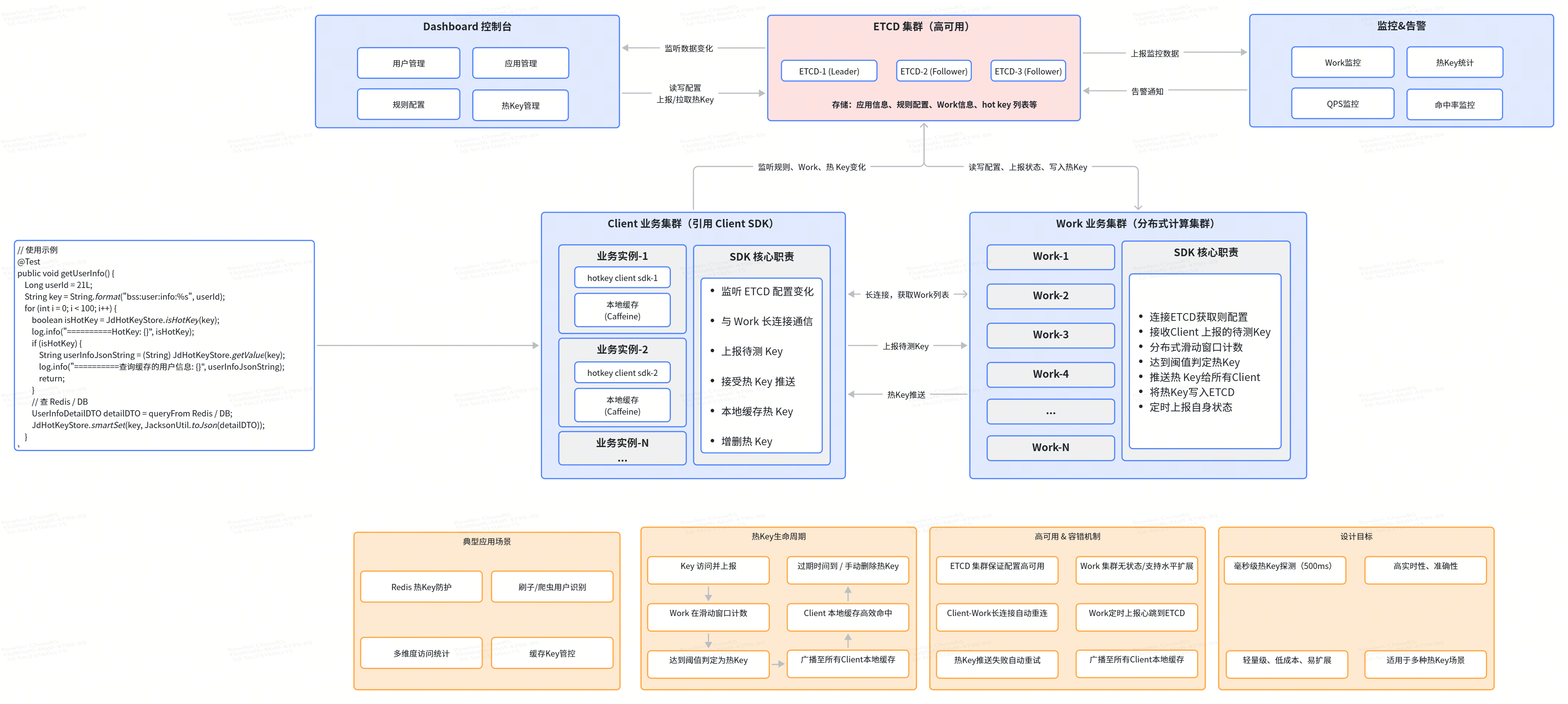
2.1.1 Comprehensive Architecture
2.1.2 Layered Architecture
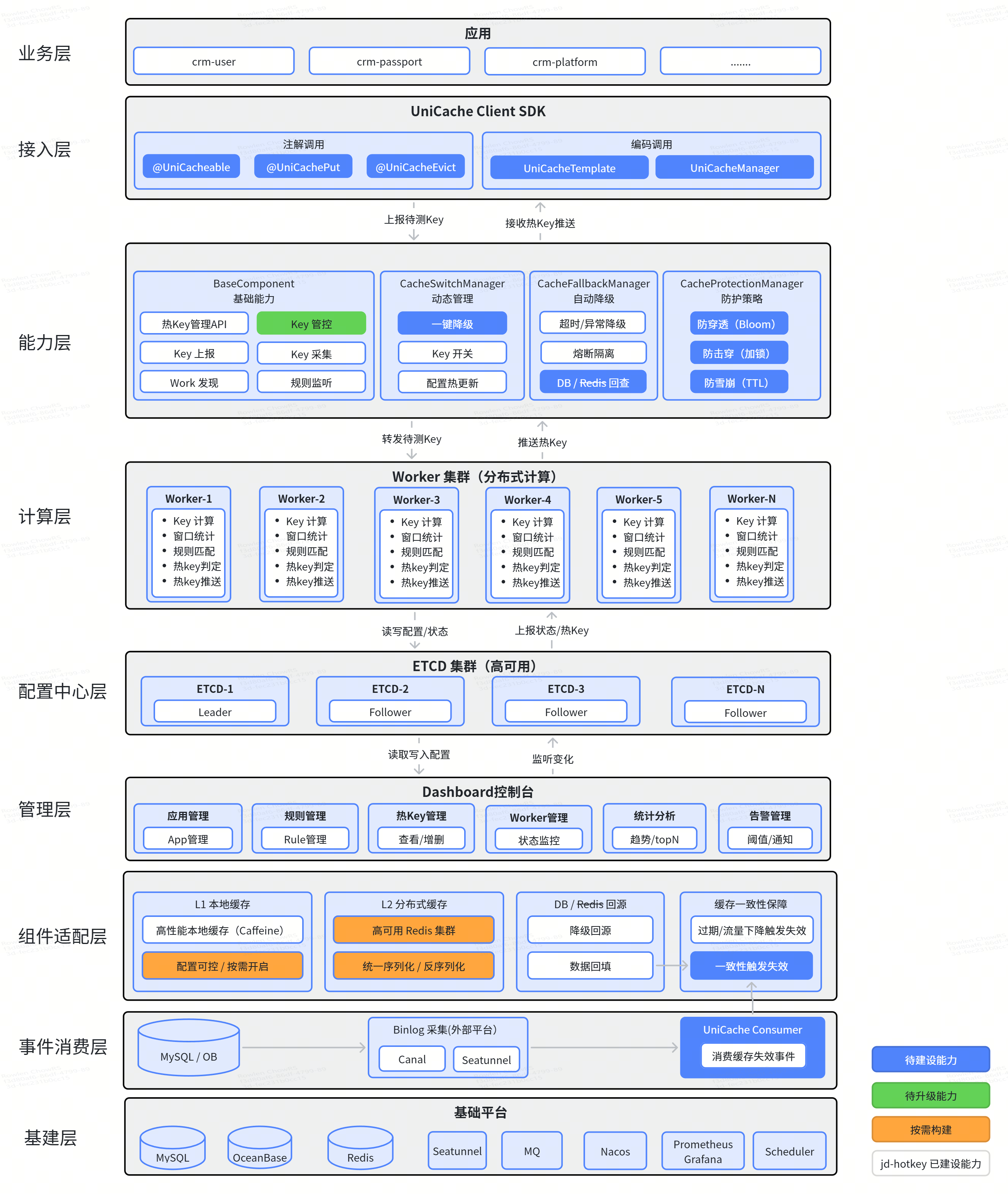
The system consists of four core components:
| Component | Responsibility | Notes |
|---|---|---|
| etcd cluster | Config center + registry | Stores hot key rules, worker node registration, hot key push relay |
| worker | Aggregation compute node | Receives access statistics from all clients, performs hot key determination, pushes hot key notifications |
| client SDK | Embedded in business applications | Collects access data, reports statistics, receives hot key notifications, caches hot data locally |
| dashboard | Visual management console | Configure rules, view hot keys, manage applications |
2.2 Data Flow
The entire hot key detection process works like an assembly line:
1 | 1. Business request hits the app; client SDK increments the access counter for the key |
Key design: centralized computation. You might wonder why not just detect hot keys locally on each client. In a distributed environment, requests for a single key are spread across machines — a key accessed 5 times on each of 100 machines looks cold on any single node, but totals 500 accesses globally. Only centralized aggregation at the worker level can accurately identify global hot spots.
Worker internal processing: after receiving client data, the worker processes it through a responsibility chain:
1 | Netty receives message |
The worker also maintains an internal hotCache (Caffeine-based, 5-second TTL) for debouncing — the same key won’t be pushed repeatedly within 5 seconds, preventing excessive redundant pushes when a hot key persists.
2.3 etcd’s Role
etcd serves three roles in this system:
Rule storage: hot key rules you configure in the dashboard (which key prefix, what threshold, what window size) are persisted in etcd. Workers and clients detect rule changes by watching etcd.
Worker registration: each worker registers its IP in etcd at startup; clients read etcd to discover which workers to connect to.
Hot key push relay: after the worker identifies a hot key, it writes to etcd with a TTL expiry. Clients watch the corresponding etcd path and update their local cache immediately upon receiving the change event.
A clever design: etcd natively supports automatic TTL-based key deletion. When a hot key is written to etcd, an expiry time is set (e.g., 60 seconds). Once expired, etcd auto-deletes it, and the deletion event triggers watch callbacks that notify all clients to clear their local cache. This achieves automatic hot key eviction without extra cleanup logic.
Why etcd over ZooKeeper? etcd natively supports TTL-based key auto-deletion (ZooKeeper doesn’t), has higher performance, lower resource usage, and a more modern API style (gRPC-based).
etcd version requirement: 3.4.x and above.
2.4 Sliding Window Algorithm
This is the core algorithm for hot key determination. JD-HotKey uses a dual-buffer Map to implement the sliding window:
1 | Worker's dual-Map mechanism: |
- Dual-Map alternation: one Map handles writes for newly reported data, the other handles reads for statistics and cleanup. An
AtomicLongmodulo 2 switches read/write targets — a fully lock-free design. - Reads never block writes: while the consumer thread is tallying Map[0], the write thread is filling Map[1], with zero interference.
- Evolution: originally used Disruptor, but in real high-concurrency testing, it caused occasional data delays and wasted CPU. They switched to
LinkedBlockingQueue+ read-write separation locks, which turned out to be more stable.
Key hash distribution: when clients report data, they hash the key (hash(key) % workerCount), so the same key always routes to the same worker. This ensures all statistics for a given key are concentrated on one worker, eliminating cross-worker aggregation. Workers don’t communicate with each other — they compute independently.
2.5 JdHotKeyStore — Core API
JdHotKeyStore is the core operation class in the client SDK. It has only 4 static methods:
| Method | Purpose | Use Case |
|---|---|---|
isHotKey(key) |
Checks if key is hot, also reports access for that key | Most common — for interception or rate limiting scenarios |
get(key) |
Reads the cached value from local memory for a hot key | Used with smartSet |
smartSet(key, value) |
Sets the local cache value for a hot key | Stores real data when key has been determined as hot |
getValue(key) |
Combined query: returns value if in local cache, returns null and auto-reports if not | All-in-one query method |
Pay attention to the behavioral differences between these methods — many people confuse them at first:
1 | isHotKey(key) → returns true/false, also reports key access count (+1) |
An internal detail: when the worker pushes a hot key notification to a client, the client first stores a magic value (0x12fcf76) in Caffeine as a placeholder, meaning “this key is now flagged as hot, but no actual business data has been filled in yet.” So get(key) may return this magic value or null — indicating the hot marker is active but data hasn’t been populated via smartSet yet. You need to load the data yourself and write it in.
Caffeine bucketing: the client doesn’t use a single Caffeine instance for all hot keys. Instead, it buckets by expiry duration (duration) — keys with the same TTL share one Caffeine instance. This allows hot keys under different rules to have different TTLs without interference.
3. Quick Integration (Spring Boot)
Step 1: Deploy the Infrastructure
JD-HotKey depends on etcd. You need to prepare an etcd cluster first.
Installing etcd (Dev Environment)
1 | # Docker (quick single-node startup) |
Deploying the Worker
The worker is a standalone Java process responsible for aggregation computation.
1 | # Build from source |
| Parameter | Description |
|---|---|
etcd |
etcd cluster address |
threads |
Worker thread count — adjust based on CPU cores |
workerPath |
Worker’s registration path in etcd |
Deploying the Dashboard
The dashboard is a web management console that needs MySQL and etcd connections.
1 | # 1. Create database, run db.sql init script |
Step 2: Add Maven Dependency
1 | <dependency> |
Dependency conflict notes:
- If your project uses Guava, upgrade to 28.2-jre or above
- If your project uses Fastjson, downgrade to 1.2.70 (the version used internally by hotkey-client)
- Communication uses protobuf — watch version compatibility
Step 3: Initialize the Client
Initialize the client at Spring Boot startup to connect to etcd and start the data pipeline:
1 |
|
Configuration options supported by ClientStarter.Builder:
| Method | Default | Description |
|---|---|---|
setAppName |
None (required) | Application name, used to match rules in dashboard |
setEtcdServer |
None (required) | etcd cluster address, comma-separated for multiple |
setCaffeineSize |
200000 | Max capacity of local Caffeine cache |
setPushPeriod |
500ms | Interval for batch-reporting statistics (minimum 50ms) |
Step 4: Configure Hot Key Rules
Configure your hot key rules in the dashboard. Rules are stored as JSON with these parameters:
1 | { |
| Field | Type | Description |
|---|---|---|
key |
String | Key match rule. Used as prefix match when prefix = true |
prefix |
boolean | Whether to use prefix matching. true matches all keys starting with key |
threshold |
int | Hot threshold — total access count exceeding this within the time window triggers hot status |
duration |
int | Sliding window size (seconds) |
interval |
int | Window slide step (seconds) |
desc |
String | Rule description for management convenience |
The config above means: any key starting with goods: that receives more than 100 accesses within 5 seconds is flagged as hot.
4. Usage Guide
4.1 Scenario 1: Hot Key Interception + Rate Limiting
The simplest usage — check if it’s a hot key, and if so, apply special handling (degradation, rate limiting, or direct response):
1 |
|
4.2 Scenario 2: Local Caching of Hot Data (Recommended)
A more practical approach — after detecting a hot key, cache the data in local memory so subsequent requests read directly from memory:
1 |
|
The smartSet design is clever: it only writes to local cache when the key has already been flagged as hot. If the key isn’t hot, the write is silently ignored — no risk of memory being bloated by non-hot data.
4.3 Scenario 3: Simplified Logic with getValue
getValue combines “check local cache + report” into a single step for cleaner code:
1 | public GoodsDetail getGoodsDetail(String goodsId) { |
4.4 Scenario 4: Hot User / Hot Endpoint Detection
JD-HotKey isn’t limited to data keys — it can also detect hot users and hot endpoints:
1 | // Hot user detection (anti-scraping / anti-abuse) |
Just configure the corresponding rules in the dashboard: key = "hot:user:" and key = "hot:api:".
5. Performance Data
5.1 Worker Performance Evolution
JD-HotKey’s performance didn’t come overnight — it went through a 17x improvement from first version to final:
| Version | QPS | CPU | Key Optimization |
|---|---|---|---|
| V1 (initial) | ~20K | >20% | Disruptor + Fastjson, hit JDK thread bug causing massive thread creation |
| V2 | ~100K | 7-10% | Replaced Disruptor with LinkedBlockingQueue |
| V3 | ~160K | ~40% | 8-core single machine tuning |
| V4 | 250-300K | ~70% | 8 producer + 8 consumer threads |
| V5 (final) | Stable 300K, peak 370K | ~50% | Serialization switched from Fastjson to Protobuf, 16 cores |
The biggest performance leap came from switching serialization: moving from Fastjson to Protobuf significantly improved serialization efficiency while actually reducing CPU usage.
5.2 Push Performance
| Push Rate | Latency |
|---|---|
| 100-120K/sec | Instant delivery, no delay |
| 200K/sec | ~1 second delay |
| 400-600K/sec (8 IO threads) | Stable push |
| 700K/sec (16 IO threads) | Stable push |
| 800K/sec (peak) | Frequent GC, eventually OOM |
5.3 Production Data
| Metric | Data |
|---|---|
| Peak cluster throughput during promotions | 15 million/sec |
| Local cache hits as % of total traffic | >50% |
| Daily key detection volume | Billions |
| 1 Worker (16 cores) can support | ~1,000 business services |
| Workers needed for millions of hot keys | ~30 |
For comparison: a typical Redis request has RT of 1-5ms, and a database request 5-50ms. JD-HotKey serves hot requests directly from JVM memory, bringing RT down to nanoseconds.
6. Comparison with Alternatives
| Dimension | JD-HotKey | Caffeine Local Cache | Redis Hot Key Detection | JetCache BOTH |
|---|---|---|---|---|
| Hot key detection | Automatic | Manual config | redis-cli --hotkeys (sampling) |
Manual config |
| Timeliness | Second-level auto detection | Static, manual updates needed | Real-time but limited accuracy | Broadcast notification |
| Dynamism | Auto join / exit | No change once configured | Manual cleanup needed | Broadcast invalidation |
| Multi-node consistency | Global unified detection | Each node independent | Redis level | Broadcast notification |
| Detection scope | Key / user / endpoint | Configured keys only | Redis keys only | Configured keys only |
| Deployment complexity | Medium (etcd + worker) | Low (pure SDK) | Low (built into Redis) | Low (pure SDK) |
| Operational cost | Medium (etcd cluster maintenance) | None | None | None |
| Best for | Unpredictable burst hot keys | Known high-frequency data | Redis hot node investigation | Known high-frequency reads |
When to Use JD-HotKey
- Burst hot keys: trending searches, breaking news, flash sale products — you can’t predict which keys will go hot
- Promotion events: 618, Singles’ Day — hot patterns are unpredictable
- Site-wide hot key protection: don’t want to manually analyze which keys are hot — let the system find them
- Hot user / hot endpoint detection: anti-scraping, anti-abuse
When You Don’t Need JD-HotKey
- Hot data is fixed and known: just use Caffeine or JetCache BOTH
- Data volume is small, Redis isn’t under pressure: no need to introduce another component
- Limited team operational capacity: deploying and maintaining an etcd cluster has a learning curve
7. Best Practices and Caveats
7.1 Threshold Tuning
Set the threshold too low → too many keys flagged as hot → local memory overflows. Set it too high → hot keys get missed → Redis gets hammered.
Recommendations:
- Core business (e.g., product details): lower threshold (e.g., 50 accesses in 5 seconds)
- Edge business: higher threshold (e.g., 200 accesses in 5 seconds)
- Use the dashboard to configure tiered thresholds — different rules for different business domains
7.2 Memory Control
Data stored via smartSet occupies the application’s JVM memory. Keep in mind:
CaffeineSizedefaults to 200,000 — adjust based on available memory and data size per entry- For large objects (e.g., full product detail JSON), reduce the capacity accordingly
- Expired hot keys are automatically removed from local cache — no manual cleanup needed
7.3 etcd Cluster Resilience
etcd is a core dependency, but the client has resilience built in:
- During brief etcd unavailability, already-pushed hot key data continues working from local cache
- Only new hot key detection and rule changes won’t take effect
- Deploy etcd with at least 3 nodes for high availability
7.4 Dependency Conflict Resolution
This is the most common pitfall during integration:
| Conflicting Dependency | Solution |
|---|---|
| guava | Upgrade to 28.2-jre or above |
| fastjson | Downgrade to 1.2.70 (the version used internally by hotkey-client) |
| protobuf | Watch version compatibility — refer to hotkey-client’s pom |
| Netty | Ensure no version conflict with Netty in your project |
| JDK version | Use JDK 1.8.0_191+ (earlier versions return host CPU count instead of container limit for availableProcessors() in containerized environments, causing abnormal thread configuration) |
Recommendation: after adding the dependency, run your unit tests to confirm there are no class conflicts. Pay special attention to guava and fastjson versions — those are the most common sources of problems.
7.5 Pair with Degradation Strategies
Hot key detection isn’t bulletproof. Pair it with degradation logic:
1 | public GoodsDetail getGoodsDetail(String goodsId) { |
7.6 Monitoring and Alerting
Recommended metrics to monitor:
- Hot key count: sudden spikes may indicate abnormal traffic
- Hot key trend changes: discover unusual patterns
- Worker health: check worker registration in etcd
- Client report delay: whether network issues are causing report backlogs
8. FAQ
Q: What’s the relationship between worker and server?
In JD-HotKey, the worker is the actual processing node. Some articles call it the “server” — it’s the same thing. The worker receives client-reported data, performs hot key determination, and pushes results. It’s deployed independently, doesn’t depend on Spring Boot, and runs as a plain Java process.
Q: How many applications can one etcd cluster support?
Theoretically unlimited, but isolation by business domain is recommended. Different applications use different appName values, and rules don’t interfere with each other. For large-scale deployments, use a dedicated etcd cluster.
Q: Does isHotKey report on every call?
Yes, every isHotKey call increments the counter in the client’s local dual Map. The client batch-reports aggregated data to the worker every pushPeriod (default 500ms). So it’s not a network request per call — it’s batch-aggregated reporting, which has minimal overhead.
Q: How do I estimate worker throughput?
The worker uses a LinkedBlockingQueue (capacity 2 million) for message buffering with multi-threaded consumption. Rule of thumb: one 16-core worker can support approximately 1,000 business services. During peak promotions, handling millions of hot keys requires about 30 workers.
Q: What’s the difference between smartSet and using Caffeine directly?
smartSet uses Caffeine internally, but with a key difference: writes only succeed when the key has been flagged as hot. If you use Caffeine directly, every key gets cached, and memory can fill up with non-hot data. smartSet handles that filtering for you.
There’s also a forceSet method that forces a cache write regardless of hot status, but it’s rarely needed.
Q: After a key is flagged as hot, how does data get populated into local cache?
JD-HotKey only tells you “this key is hot” and manages local cache storage — it doesn’t load data from your database for you. You implement the data loading logic in your code (see Scenario 2 for example code).
The full flow:
- Worker identifies hot key → pushes notification to all clients
- Client stores a magic value (
0x12fcf76) in Caffeine as a placeholder - Business code calls
isHotKey(key)→ returnstrue - Business code calls
get(key)→ returns null (magic value placeholder, no actual data yet) - Business code loads real data from Redis / DB
- Calls
smartSet(key, value)to write to local cache - Subsequent requests hit local cache directly
Q: How does this relate to Redis Cluster hot key problems?
Redis Cluster’s hot key problem: one key’s access volume concentrates on a single shard node, maxing out its CPU/bandwidth. JD-HotKey’s approach is to intercept hot requests at the application layer — data is cached in JVM memory, so it never reaches Redis at all. They’re solutions at different levels.
Q: How to deploy in production?
Recommended architecture:
- etcd: 3-node cluster (odd number, tolerates 1 node failure)
- worker: at least 2 instances (workers don’t communicate — they compute independently. Clients route different keys to different workers via hashing, providing natural load balancing)
- dashboard: 1-2 instances (web console, doesn’t carry core traffic)
- client: embedded in every business application instance
Q: How does this work with JetCache’s two-level cache (BOTH)?
They don’t conflict — they can be used together:
- JetCache BOTH: for known high-frequency read data, provides L1 + L2 two-level cache + auto refresh
- JD-HotKey: for unpredictable burst hot keys, auto-detects and caches
Combined approach: JetCache handles regular caching, JD-HotKey provides burst hot key protection. When JD-HotKey flags a key as hot, data goes straight from JVM memory — it doesn’t even need to hit JetCache’s L2 (Redis).
9. Summary
JD-HotKey’s core value is automatic hot key detection — this is what sets it apart from other caching solutions. You don’t need to know in advance which keys will go hot. The system automatically determines hot status based on real access volume, auto-pushes, and auto-evicts when keys cool down.
| Scenario | Recommended Solution |
|---|---|
| Known fixed high-frequency data | Caffeine or JetCache BOTH |
| Unpredictable burst hot keys | JD-HotKey |
| Redis hot node protection | JD-HotKey (application-layer interception) or Redis hot shard |
| Hot user / hot endpoint detection | JD-HotKey |
If your business has “could go hot at any moment without warning” scenarios (e-commerce flash sales, trending topics, breaking news), JD-HotKey can automatically identify and protect those hot keys, intercepting requests in JVM memory before they overwhelm Redis and your database.
It’s not a silver bullet, though — etcd deployment and maintenance, dependency conflict resolution, and threshold tuning all require investment. I’d suggest piloting it on a non-critical service first, then rolling it out to your core paths once you’ve validated the results.